Deploying an AI Agent Platform to Fly.io — What We Learned the Hard Way
Multi-agent AI is no longer a research topic. Tools like Paperclip let you run a structured org of AI agents — think org charts, task assignment, cost controls, and governance — using real AI adapters like Claude Code and Codex. It’s the kind of infrastructure that was science fiction two years ago.
We recently deployed Paperclip to Fly.io for a client and came away with a working setup and a long list of hard-won lessons. This post is the guide we wished existed when we started.
What We Built
A single-container Fly.io deployment running:
- Paperclip (via
npm install -g paperclipai) - Claude Code CLI (so agents can actually write and run code)
- PostgreSQL 17 (system package, persisted on a Fly volume)
- Tailscale (HTTPS with no public IP needed)
The result: a private, secure AI agent platform accessible only over your tailnet, with agent state and memory persisting across restarts.
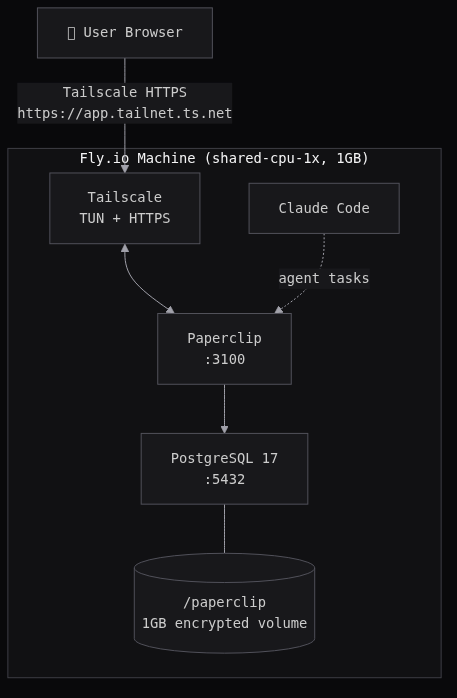
The Setup
1. Create the app and volume
flyctl apps create $APP_NAME --org your-org
flyctl volumes create paperclip_data --region sjc --size 1 --yes
flyctl ips allocate-v6 --private   # Flycast — no public access
2. Set secrets
Four secrets to configure before you deploy.
BETTER_AUTH_SECRET
Signs session cookies. Generate once and don’t change it (changing it invalidates all active sessions):
flyctl secrets set BETTER_AUTH_SECRET="$(openssl rand -hex 32)"
TAILSCALE_AUTH_KEY + TAILNET_DNS
Tailscale gives Paperclip a private HTTPS hostname without exposing a public IP. To connect a new machine to your tailnet, you need an auth key.
Important: use a reusable key. Single-use keys are consumed on first boot and become invalid on any subsequent deploy or restart. Fly machines redeploy on every flyctl deploy, so a single-use key will leave you locked out.
- Go to tailscale.com/admin/settings/keys
- Click Generate auth key
- Check Reusable — this is the critical part
- Optionally check Ephemeral if you want the device removed from your tailnet when the machine stops (useful for dev, avoid in prod)
- Copy the key — it starts with
tskey-auth-
You also need your tailnet’s DNS suffix. Find it at tailscale.com/admin/dns under Tailnet name — it looks like tail1234ab.ts.net. The entrypoint uses this to construct your app’s HTTPS URL: https://$FLY_APP_NAME.$TAILNET_DNS.
flyctl secrets set TAILSCALE_AUTH_KEY=tskey-auth-...
flyctl secrets set TAILNET_DNS=tail1234ab.ts.net
CLAUDE_CODE_OAUTH_TOKEN
This is what allows your Paperclip agents to use Claude Code as their AI adapter. Instead of a raw API key (which burns pay-per-token credits), you can authenticate with your Claude.ai subscription — the same account you use in the browser.
Run this locally (you need Claude Code installed: npm install -g @anthropic-ai/claude-code):
claude setup-token
It’ll open a browser to authenticate and print a long-lived OAuth token. Set it as a secret:
flyctl secrets set CLAUDE_CODE_OAUTH_TOKEN=<token from above>
Agents on the machine will now bill against your subscription rather than per-API-call.
3. The Dockerfile
No building Paperclip from source — just install it globally alongside system PostgreSQL:
# System Postgres — embedded Postgres doesn't init correctly in Docker (see Gotchas)
FROM node:lts-trixie-slim

RUN apt-get update \
  && apt-get install -y --no-install-recommends \
     ca-certificates curl git postgresql postgresql-client \
  && rm -rf /var/lib/apt/lists/*

# Tailscale — private HTTPS hostname without a public IP
RUN curl -fsSL https://tailscale.com/install.sh | sh

# Paperclip + Claude Code agent CLI
RUN npm install -g paperclipai @anthropic-ai/claude-code

# node owns /paperclip (non-root); postgres owns the Unix socket dir
RUN mkdir -p /paperclip/instances/default /var/run/tailscale /var/run/postgresql \
  && chown -R node:node /paperclip \
  && chown postgres:postgres /var/run/postgresql

# Config goes to /etc/paperclip, not /paperclip — the volume mount would overwrite it
COPY docker/config.json /etc/paperclip/config.json
COPY docker/start.sh /start.sh
RUN chmod +x /start.sh

# Secrets (BETTER_AUTH_SECRET, TAILSCALE_AUTH_KEY, CLAUDE_CODE_OAUTH_TOKEN) are
# injected at runtime via `flyctl secrets set` — never baked into the image
ENV NODE_ENV=production \
    HOME=/paperclip \
    HOST=0.0.0.0 \
    PORT=3100 \
    SERVE_UI=true \
    PAPERCLIP_HOME=/paperclip \
    PAPERCLIP_INSTANCE_ID=default \
    PAPERCLIP_CONFIG=/paperclip/instances/default/config.json \
    DATABASE_URL=postgres://paperclip:paperclip@localhost:5432/paperclip

# Fly volume mount — persists Postgres data, config, and Tailscale state across restarts
VOLUME ["/paperclip"]
EXPOSE 3100

CMD ["/start.sh"]
4. The supporting files
Two files go in a docker/ folder alongside the Dockerfile.
docker/config.json — Paperclip instance config. Stashed at /etc/paperclip/config.json in the image and copied into the volume on first boot (see the start.sh note below on why):
{
  "$meta": {
    "version": 1,
    "updatedAt": "2026-03-16T00:00:00.000Z",
    "source": "onboard"
  },
  "database": {
    "mode": "postgres",
    "connectionString": "postgres://paperclip:paperclip@localhost:5432/paperclip",
    "backup": {
      "enabled": true,
      "intervalMinutes": 60,
      "retentionDays": 30,
      "dir": "/paperclip/instances/default/data/backups"
    }
  },
  "logging": {
    "mode": "file",
    "logDir": "/paperclip/instances/default/logs"
  },
  "server": {
    "deploymentMode": "authenticated",
    "exposure": "private",
    "host": "0.0.0.0",
    "port": 3100,
    "allowedHostnames": [],
    "serveUi": true
  },
  "auth": {
    "baseUrlMode": "auto",
    "disableSignUp": false
  },
  "storage": {
    "provider": "local_disk",
    "localDisk": {
      "baseDir": "/paperclip/instances/default/data/storage"
    },
    "s3": {
      "bucket": "paperclip",
      "region": "us-east-1",
      "prefix": "",
      "forcePathStyle": false
    }
  },
  "secrets": {
    "provider": "local_encrypted",
    "strictMode": false,
    "localEncrypted": {
      "keyFilePath": "/paperclip/instances/default/secrets/master.key"
    }
  }
}
docker/start.sh — the entrypoint. Handles Tailscale startup, Postgres init, config bootstrapping, and hostname derivation — then launches Paperclip as the node user. On first boot it auto-generates an admin invite URL and prints it in flyctl logs.
The key design: your app name goes in fly.toml once, your tailnet DNS goes in as a secret once. Everything else — the public URL, HTTPS hostname, allowed hostnames — derives automatically from FLY_APP_NAME and TAILNET_DNS. No hardcoded strings.
#!/bin/sh
set -e

# Start tailscaled (persist state on volume, use TUN if available)
mkdir -p /paperclip/tailscale
if [ -e /dev/net/tun ]; then
  tailscaled --statedir=/paperclip/tailscale \
    --socket=/var/run/tailscale/tailscaled.sock &
else
  tailscaled --statedir=/paperclip/tailscale \
    --socket=/var/run/tailscale/tailscaled.sock \
    --tun=userspace-networking &
fi
sleep 2

# Bring up Tailscale if auth key is set
if [ -n "$TAILSCALE_AUTH_KEY" ]; then
  tailscale up --auth-key="$TAILSCALE_AUTH_KEY" --hostname="${FLY_APP_NAME:-paperclip}"
  tailscale serve --bg --https 443 3100
fi

# Copy config into volume if not present (volume mount overwrites image COPY)
mkdir -p /paperclip/instances/default
if [ ! -f /paperclip/instances/default/config.json ]; then
  cp /etc/paperclip/config.json /paperclip/instances/default/config.json
fi

# Init and start PostgreSQL
PG_BIN=$(pg_config --bindir)
PG_DATA=/paperclip/pgdata
if [ ! -f "$PG_DATA/PG_VERSION" ]; then
  mkdir -p "$PG_DATA"
  chown postgres:postgres "$PG_DATA"
  su -s /bin/sh postgres -c "$PG_BIN/initdb -D $PG_DATA"
  echo "host all all 127.0.0.1/32 trust" >> "$PG_DATA/pg_hba.conf"
fi

chown -R postgres:postgres "$PG_DATA"
su -s /bin/sh postgres -c "$PG_BIN/pg_ctl -D $PG_DATA -l $PG_DATA/postgres.log start"
sleep 2

# Create database and user if needed
su -s /bin/sh postgres -c "$PG_BIN/psql -tc \"SELECT 1 FROM pg_roles WHERE rolname='paperclip'\" | grep -q 1 || $PG_BIN/createuser paperclip"
su -s /bin/sh postgres -c "$PG_BIN/psql -tc \"SELECT 1 FROM pg_database WHERE datname='paperclip'\" | grep -q 1 || $PG_BIN/createdb -O paperclip paperclip"

# Derive public URL from TAILNET_DNS > FLY_APP_NAME.fly.dev > localhost:3100
if [ -n "$TAILNET_DNS" ] && [ -n "$FLY_APP_NAME" ]; then
  PAPERCLIP_HOST="${FLY_APP_NAME}.${TAILNET_DNS}"
  PAPERCLIP_PROTO="https"
else
  PAPERCLIP_HOST="${PAPERCLIP_HOST:-${FLY_APP_NAME:+${FLY_APP_NAME}.fly.dev}}"
  PAPERCLIP_HOST="${PAPERCLIP_HOST:-localhost:3100}"
  PAPERCLIP_PROTO="${PAPERCLIP_PROTO:-http}"
fi

export PAPERCLIP_PUBLIC_URL="${PAPERCLIP_PROTO}://${PAPERCLIP_HOST}"
export BETTER_AUTH_BASE_URL="${PAPERCLIP_PROTO}://${PAPERCLIP_HOST}"

npx paperclipai allowed-hostname "$PAPERCLIP_HOST" 2>/dev/null || true
npx paperclipai allowed-hostname "localhost" 2>/dev/null || true

if [ -n "$FLY_APP_NAME" ]; then
  npx paperclipai allowed-hostname "${FLY_APP_NAME}.internal" 2>/dev/null || true
  npx paperclipai allowed-hostname "$(hostname -i 2>/dev/null || echo '127.0.0.1')" 2>/dev/null || true
fi

chown -R node:node /paperclip/instances
chown node:node /paperclip

# runuser preserves env vars — su does not (see Gotchas)
runuser -u node -- npx paperclipai run &
APP_PID=$!

if [ ! -f /paperclip/instances/default/.bootstrapped ]; then
  sleep 10
  runuser -u node -- npx paperclipai auth bootstrap-ceo --base-url "$PAPERCLIP_PUBLIC_URL" && \
    touch /paperclip/instances/default/.bootstrapped
fi

wait $APP_PID
5. Deploy
flyctl deploy --no-public-ips
Check flyctl logs for the admin invite URL. Open it in your browser, create your account, then start adding agents.
The Gotchas (The Actual Value)
We hit every one of these. You shouldn’t have to.
embedded-postgres doesn’t work in Docker
Paperclip ships with an embedded Postgres for local dev. It doesn’t init correctly in Docker containers — the error is a cryptic “init script exited with code 1.” Install system PostgreSQL instead and point Paperclip at it via DATABASE_URL.
Config field name is connectionString, not url
The config schema uses database.connectionString. Using url silently fails — the doctor command just says “no connection string configured.”
$meta is required
The config file needs a $meta block with at least version: 1. Without it, validation fails with a confusing error about an unrelated field.
su drops environment variables
su -s /bin/sh node -c "..." drops all env vars, including the ones Paperclip needs for auth and hostname config. Use runuser -u node -- instead — it preserves the environment.
Authenticated mode blocks health checks
Paperclip’s hostname guard rejects requests from unknown Host headers with a 403. Fly’s health checks use internal hostnames that aren’t on the allow list. Fix: add [http_service.checks.headers] with Host = "localhost" in fly.toml.
512MB isn’t enough memory
Running Paperclip + PostgreSQL + Tailscale + Claude Code in one container needs at least 1GB. At 512MB, Claude Code gets OOM-killed mid-response (exit 137). Set memory = "1024mb".
Tailscale: use TUN mode on Fly, not userspace
tailscale serve --https requires full TUN mode — userspace networking doesn’t support TLS cert provisioning. Fly VMs have /dev/net/tun. Use it.
Use --statedir, not --state
tailscaled --state=/path/to/file breaks cert provisioning. Use --statedir=/paperclip/tailscale (a directory) instead. This also persists Tailscale state on the volume so it survives restarts.
Use reusable auth keys
Single-use Tailscale auth keys are consumed on first boot. After any redeploy, the key is invalid and Tailscale won’t reconnect. Generate a reusable key at the Tailscale admin console.
Fly volume mount overwrites COPY’d files
Fly mounts the volume at /paperclip, which replaces everything the Dockerfile COPY’d there. The fix: stash config at /etc/paperclip/config.json in the image layer and copy it into the volume on first boot in the entrypoint. Check for the file before copying so you don’t overwrite an existing config on restarts.
PostgreSQL binaries aren’t on PATH
System Postgres installs to /usr/lib/postgresql/17/bin/ — not on PATH for other users. Use $(pg_config --bindir) to find them reliably.
Health check grace period
First boot takes 30–45 seconds: Tailscale negotiation, Postgres init, 28 schema migrations. Set grace_period = "120s" or Fly kills the machine before it’s ready.
min_machines_running = 1 is required
auto_stop_machines = "suspend" suspends the VM when idle. Tailscale connections don’t count as activity for Fly’s proxy, so the machine suspends and becomes unreachable over Tailscale. Keep it running.
The Full fly.toml
app = "your-app-name"
primary_region = "sjc"

[build]

[env]
  NODE_ENV = "production"
  PORT = "3100"
  HOST = "0.0.0.0"
  SERVE_UI = "true"
  PAPERCLIP_HOME = "/paperclip"
  PAPERCLIP_INSTANCE_ID = "default"
  PAPERCLIP_CONFIG = "/paperclip/instances/default/config.json"
  PAPERCLIP_DEPLOYMENT_MODE = "authenticated"
  PAPERCLIP_DEPLOYMENT_EXPOSURE = "private"

[http_service]
  internal_port = 3100
  force_https = true
  auto_stop_machines = "suspend"
  auto_start_machines = true
  min_machines_running = 1

[[http_service.checks]]
  grace_period = "120s"
  interval = "30s"
  method = "GET"
  path = "/api/health"
  timeout = "10s"

  [http_service.checks.headers]
    Host = "localhost"

[mounts]
  source = "paperclip_data"
  destination = "/paperclip"

[[vm]]
  size = "shared-cpu-1x"
  memory = "1024mb"
Wrapping Up
Paperclip is genuinely interesting infrastructure — structured AI agent orchestration with real governance controls. Deploying it well requires navigating some rough edges in both Paperclip itself and the Fly + Tailscale stack, but the result is a private, production-grade AI agent platform running for a few dollars a month.
If you’re setting this up and hit a wall, drop us a line.